ATAI Level AI
Gold automation, built around market movement.
A two-sided gold strategy for MetaTrader 5, with virtual entries, coordinated basket exits and optional news-only trading. Designed for active, volatile markets—including major USD releases—with a fixed trading model and focused controls.

- Gold / USD only · MT5 hedging accounts
- USD 10,000 minimum new-basket equity
- Any chart timeframe · tick-driven execution
- Optional trading around ATAI-classified USD news
- Asynchronous basket closing and restart recovery
- One trading account per active licence
Match your buying power.
The reference is $10,000 USD at 1:100 gold leverage. Lower leverage needs more capital to match it. Higher leverage never reduces the $10,000 floor.
Use the terms for gold / XAUUSD, not your account’s headline leverage. A 7.5% margin requirement is about 1:13.33 leverage.
Enter your broker’s gold leverage or margin percentage to see the amount.
How this amount is calculated
Capital = the higher of $10,000 and ($1,000,000 ÷ gold leverage), or ($1,000,000 × gold margin % ÷ 100). Results are rounded up to the next whole USD.
This compares theoretical margin capacity under linear margin rules. It does not measure the EA’s worst possible loss or guarantee that the strategy can operate successfully. Fees, open positions and trading losses reduce available buying power; additional reserves may be needed.
Confirm with your broker before purchasing. Check gold margin, contract size, hedged-position rules and any higher margin tiers. Your account needs sufficient available buying power, not just the displayed balance. This tool does not verify your broker or account.
One account. A complete workflow.
Before purchasing: use the buying-power calculator and confirm your broker’s gold margin requirements. Lower leverage can require more capital. Payment is confirmed before access is activated. Download from your account, bind the licence to your trading account, and test on demo first. Renew manually or buy another licence for a separate account. The EA’s fixed $10,000 equity gate for new baskets does not adjust to broker leverage; it is not a substitute for this buying-power check.
Explore the account history.
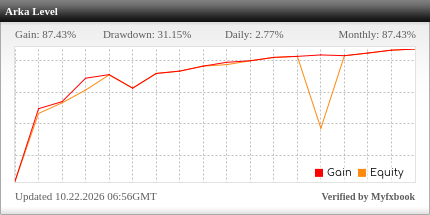
Historical reference account; editions, settings and broker conditions may differ from this release. Update timing and data availability depend on Myfxbook and the connected account. Past performance does not guarantee future results.
What Level AI does
Level AI is an automated, rules-based gold Expert Advisor. It prepares buy triggers above price and sell triggers below price. When a level is reached, the running EA requests a market order. The trigger levels stay inside the terminal; the EA does not place pending entry orders at the broker.
Positions are managed as a basket. It can hold buys and sells at the same time and adds exposure at fixed levels. This is a hedging strategy, so a MetaTrader 5 hedging account is required; MT4 and netting accounts are not supported.
The strategy is intended for active price movement, including volatile news periods. More volatility does not necessarily mean more profit: reversals, spreads, gaps and execution delays can cause substantial losses. The product name does not mean that a language model makes its trading decisions.
Install and activate your licence
- Purchase the monthly licence, then open Account → Downloads & licences. Download ATAI_Level_AI_MT5_v1_00.ex5, select Manage licence, enter your MT5 account number and exact broker server name, and copy the Licence ID. No broker password is needed for EA licensing.
- In MetaTrader 5, choose File → Open Data Folder → MQL5 → Experts. Copy the EX5 file there, then refresh Navigator → Expert Advisors or restart MT5.
- Before attaching the EA, enable the ATAI WebRequest connection as described below. Open the broker’s Gold/USD symbol—XAUUSD, GOLD or a supported broker suffix—and attach Level AI once. Enter your Licence ID in Inputs.
- Enable Allow Algo Trading in the EA and the Algo Trading button in MT5. Check that the panel shows an active licence. Test on a demo hedging account before using a live account. Keep the terminal connected, ideally on a reliable VPS.
- This is a separate ATAI edition. Start with no existing basket from HedgeGrid or another EA to migrate. It uses its own position identifier and does not take over another tool’s trades.
Required: allow the ATAI connection
Open Tools → Options → Expert Advisors. Tick “Allow WebRequest for listed URL” and add the exact HTTPS address below. Click OK, then attach or restart Level AI. DLL imports are not required.
This permission is required for licence verification even when News Trading is OFF. When News Trading is ON, the same domain supplies the news calendar. Do not add an unrelated broker URL as a substitute.
If the panel reports a WebRequest or connection error, confirm the exact address, internet access and active subscription. With News Trading ON, stale or unavailable calendar data prevents a new basket from starting; a running basket continues to be managed.
https://atai.caOfficial MetaTrader documentation ↗Account, capital and timeframe
Use an MT5 hedging account and a broker’s gold instrument quoted in US dollars. The account must support 0.02, 0.08 and 0.30 lot orders. Low spreads, low commissions and reliable execution matter because the basket profit targets are small.
At least USD 10,000 of equity is required before a NEW basket starts. USD cent balances are converted to actual dollars; other account currencies require a fresh broker FX quote in Market Watch. If conversion cannot be verified, new baskets wait. Falling below the minimum during a basket does not disable its management or force it to close.
Any chart timeframe is supported. Level AI reacts to live ticks and its management timer; it does not use the displayed candle period as an entry schedule. Changing from M5 to H1 does not change its grid timing, and there is no requirement to use M15. Reattaching or changing timeframe reloads the saved basket state.
The capital threshold is an entry requirement, not a guarantee that the account can survive every market condition.
News Trading: trade within a release window
News Trading is OFF by default, matching the source strategy. OFF means normal operation subject to broker-session and execution checks. Turning it ON limits NEW baskets to the selected ATAI news windows. It does not pause around news.
For a USD release at 14:30 broker time, the default 10-minute lead and 120-minute after period permit new baskets from 14:20 until 16:30, provided the broker-session checks also allow them. After the window ends, a running basket continues its normal grid, target and trailing management. Once it finishes, the EA waits for the next eligible window.
Only USD releases are used for gold. ATAI’s calendar classification is authoritative, rather than the broker’s own impact labels. Select high impact only, high plus medium, or all three impact levels. Overlapping eligible news windows are combined. Untimed releases cannot create an exact trading window.
Choose MinutesBeforeNews and MinutesAfterNews from 0 to 1,440. The calendar updates while the basket is flat to avoid delaying exits with news requests. News timing is adapted to broker time; your country and desktop timezone do not determine the window.
Broker sessions and basket protection
The broker’s published gold trading sessions determine the schedule. New baskets stop 120 minutes before a session closes and resume 60 minutes after it opens. Adjacent sessions are merged so midnight itself is not treated as a closing break. Weekly openings are considered separately.
The session rule still applies when News Trading is ON. A news window does not override a closed market or the daily pause. A broker session that is too short, or an unavailable schedule, holds new baskets.
These pauses do not liquidate an existing basket just because the time changes. Existing positions continue their normal strategy and exit management. The EA starts another basket only after the prior basket and any outstanding requests have been reconciled.
Your available settingsOnly the licence and news controls appear in Inputs
| Setting | Default | Meaning |
|---|---|---|
| InpLicenseID | Empty | Paste the Licence ID from your ATAI Downloads & licences page. Bound to one MT5 account and broker server. |
| NewsTrading | false / OFF | OFF: normal session operation. ON: start new baskets only within eligible USD news windows. |
| MinutesBeforeNews | 10 | Minutes before the scheduled release when the new-basket window starts. Range: 0–1,440. |
| MinutesAfterNews | 120 | Minutes after release when the new-basket window ends. Existing baskets continue to be managed. Range: 0–1,440. |
| NewsImpactFilter | High impact only | Choose high only, high + medium, or high + medium + low, using ATAI’s classifications. |
The fixed trading model
The customer edition exposes only activation and news controls. Lot sizing, grid spacing, basket exits, execution parameters, session buffers and dashboard layout are fixed in the executable.
The first level is 1.50 gold-price units away from the initial quote, or the broker’s larger minimum if applicable; subsequent levels are 1.50 apart. Each side has seven levels at 0.02 lots, seven at 0.08 and seven at 0.30. The planned total is 5.60 lots across both sides, subject to broker volume limits and successful execution. Levels can remain unfilled.
The basket target is 3.00 in the account’s currency, including recorded deal costs. Virtual basket trailing arms at 1.50 and follows the peak with a 0.75 gap; it can trigger a close before the fixed target. The fixed target takes priority when reached. These are account-currency amounts—not gold-price changes. For a USD account, they are dollars; for a cent account, they are cents.
The model does not have a fixed maximum-loss cutoff or per-position trailing stop enabled. An initial spread above 0.80 gold-price units prevents a NEW grid, but does not stop a running grid from adding at its original triggers. Slippage and the eventual closing costs can make the final realised result differ from the profit seen when a close begins.
After a completed cycle, the normal restart delay is five seconds. A new basket still needs a valid licence, sufficient equity, session permission and—when enabled—a current news window.
Dashboard, closing and reconnection
The blue panel shows the licence status and expiry, position count, open volume, cycle profit/loss, basket-trailing state, broker session, news state and operating status. It deliberately does not show the next buy/sell trigger prices or distances, and it draws no green/red virtual-entry lines. Hover over shortened panel text to read its full explanation.
Close & pause requests closure of the current basket, including at a loss if you choose it. Resume allows another basket once all entry checks pass. These are on-chart actions; they do not expose the fixed strategy settings.
Closing retains the v1.08 asynchronous request queue: up to eight requests can be in flight. When supported by the broker, Close By can offset opposite positions. Otherwise the EA uses market closing; FIFO rules may require serial closing. Closing is not instant or guaranteed at the displayed profit.
The EA records virtual entries and closing requests before sending them, reconciles broker responses, and waits for completed closure before restarting. On reconnection, it recovers its own saved basket rather than blindly starting another one. Keep the same terminal data folder; do not delete its state files or global variables during a basket.
A missing, expired or mismatched licence blocks new exposure while existing exit management remains active. Licence requests are bounded and are skipped during an incomplete closing operation. The customer build requires an online chart for licensing; the online news feed is unavailable in Strategy Tester.
Subscription, reference results and risk
The monthly licence costs USD 500 for 30 days on one MT5 account. Renewals are manual. Choose a new licence at checkout if you need a second account; choose renewal to extend an existing licence. Prices and any available discounts are shown before payment.
The linked Myfxbook account is a historical strategy reference. Its account name may still show the original research name. Broker, settings, deposits and software edition may differ from your installation. Open Myfxbook to check the latest update, account type and verification details. The website widget is supplied by Myfxbook.
In extreme market conditions, drawdown of 50% or more is possible. This is not a maximum-loss limit. Leveraged gold trading can lose the entire trading balance, and USD 10,000 does not guarantee protection. Sharp reversals, sustained trends, widening spreads, gaps, latency and margin requirements can make the strategy fail.
Past performance does not guarantee future results. No return is promised. Use demo testing to understand the behaviour, keep the terminal connected, and review the Terms of Use and risk disclosure before subscribing.